
 Written by
 What Is the Simucube 2 Wheels Simucube 3 Adapter?
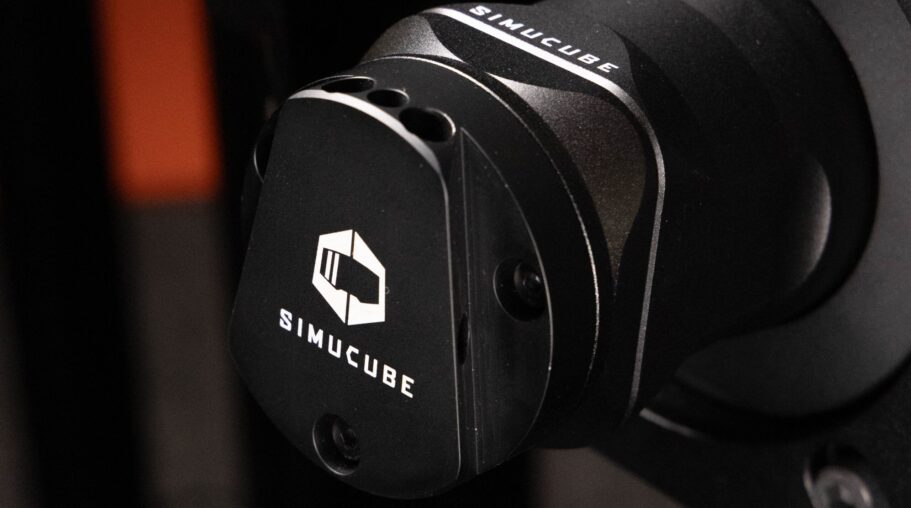
Simucube has released the Simucube 2 wheels Simucube 3 adapter, a compact but significant accessory that lets owners of Simucube 2 wheels and rims bolt them straight onto a Simucube 3 wheelbase. Instead of forcing simracers to buy new wheels alongside a new base, the adapter slots into the Simucube 3’s Link Quick Release interface and gives it the ability to accept any rim built around the Simucube Quick Release (SQR) standard. That covers the QR1 and QR2 systems used across the Simucube 2 lineup, along with third-party rims from brands like Ascher Racing, Cube Controls, Sim-Plicity, and VRS that were originally designed to work with Simucube 2 bases. If you’re weighing a move up from a Simucube 2 Pro or Ultimate, this adapter changes the math considerably.
Simucube built its reputation on the Simucube 2 Sport, Pro, and Ultimate, and the adapter answers the question every owner of those bases runs into when upgrading: what happens to the rim already installed. It ships as a standalone accessory, sold separately from the Simucube 3 wheelbase itself, and it’s aimed squarely at simracers who don’t want their existing hardware collection to become dead weight the moment a new wheelbase generation arrives. That matters most for simracers who’ve spent seasons fine-tuning grip feel, rim diameter, and button layout, since none of that setup work has to be repeated when the wheelbase itself changes generations.
Why Simucube Built This Adapter
Direct drive wheelbases are expensive, but the rims that sit on top of them often represent just as much investment once you factor in custom button boxes, paddle modules, and display units. Simucube 2 owners who spent years building out a rim setup they like shouldn’t have to start from zero just because they want the extra torque, refinement, or feature set of Simucube 3. For many simracers, the rim is the more personal part of the setup, shaped by hand fit, button layout, and years of muscle memory.
Granite Devices Oy, the Finnish company behind Simucube, kept the SQR standard open enough for third-party manufacturers to design around it years before Simucube 3 existed. This adapter extends that same approach to the new generation of hardware, preserving the value of existing rim collections and cutting the real cost of moving up. It also signals that Simucube expects the SQR ecosystem to remain relevant for years to come, rather than treating Simucube 3 as a clean break from everything that came before it. It’s a pragmatic move in a category where full wheel-and-base bundles can otherwise price out a large share of the community.
Compatibility: Which Simucube 2 Wheels Work
The adapter is built around the SQR mounting standard, which means compatibility isn’t limited to Simucube’s own rims. Any wheel or rim originally designed for a Simucube 2 Sport, Pro, or Ultimate base mounts without modification, since they all share the same quick release geometry. For a broader look at torque tiers and mounting standards across the segment, see our guide to the best direct drive wheelbases currently available.
- Official Simucube 2 rims and wheels using QR1 or QR2 quick release systems
- Third-party rims from Ascher Racing built for Simucube 2 compatibility
- Cube Controls wheels designed around the SQR standard
- Sim-Plicity rims manufactured for Simucube 2 bases
- VRS wheels compatible with Simucube 2’s quick release interface
One exception worth flagging: the Lightbridge system does not work with this adapter. If your current setup relies on Lightbridge for wireless data transfer, that functionality won’t carry over once the adapter is installed on a Simucube 3 base, so it’s worth checking your rim’s connectivity method before committing to the swap.
QR1 and QR2 Rim Support
Simucube’s quick release history runs through two main generations, QR1 and QR2, both of which remain supported through this adapter. QR2 improved the locking mechanism and connector reliability over the original QR1 design, but Simucube kept both standards mechanically compatible across its ecosystem, so the adapter doesn’t force a choice between them.
Bluetooth connectivity, used by many rims for button and encoder data, continues to work normally through the adapter. Simracers relying on wireless rim communication won’t notice any functional difference beyond the base itself, which should make the transition largely invisible in day-to-day use once the adapter is fitted.
How the Adapter Works: Technical Overview
Mechanically, the adapter replaces the Link Quick Release interface that ships standard on Simucube 3 wheelbases. Link QR is Simucube’s newer connector system, built for the latest generation of rims and accessories, but it isn’t natively compatible with older SQR-based wheels. The adapter bridges that gap by physically substituting for the Link QR hub, giving the base an SQR-compatible mounting point instead.
The adapter is compatible with every Simucube 3 variant, so there’s no need to check which specific wheelbase model you own before ordering. Whether you’re running the entry-level or the higher-torque version of Simucube 3, the same adapter fits, which simplifies the buying decision considerably for anyone already committed to the platform.
Installation Steps
Fitting the adapter doesn’t require any tools beyond what’s included in the box, and the process follows a straightforward sequence:
- Power down and unplug the Simucube 3 wheelbase before starting any hardware work
- Remove the existing Link Quick Release from the front of the wheelbase
- Attach the Simucube 2-to-3 adapter using the screws provided in the kit
- Mount your Simucube 2 wheel or rim onto the adapter’s quick release interface
- Reconnect power and confirm the base recognizes the wheel before running any force feedback test
The announcement makes no mention of firmware updates or software reconfiguration, which keeps the swap quick for anyone already comfortable removing and refitting a quick release hub. Most owners should be able to complete the process in a few minutes without needing to touch Simucube’s configuration software at all. Keep the original Link Quick Release hardware stored safely, since reinstalling it later restores full native Link QR compatibility without needing a replacement part from Simucube.
Pricing and Availability
The adapter is available now through simucube.com as well as authorized Simucube retailers. Simucube backs the accessory with a 3-year warranty, matching the coverage simracers expect from the rest of the brand’s hardware lineup.
Exact pricing wasn’t listed in the announcement, so anyone planning an upgrade should check current listings directly with Simucube or a local retailer before budgeting for the switch. Bundled pricing alongside a new Simucube 3 wheelbase also wasn’t addressed, so it’s worth asking retailers whether combined deals are offered at checkout. Simracers should also confirm whether extended warranty registration is required after installation, since some Simucube accessories need to be registered online to activate the full coverage period.
Simucube 2 vs Simucube 3: What Changes
The core difference between the two generations sits in the wheelbase itself rather than the wheels attached to it. Simucube 2 established the torque tiers that became a benchmark for the segment; Simucube 3 builds on that same direct drive lineage with a new quick release standard and updated internals. That distinction matters for buyers trying to decide whether the upgrade is about raw torque, refined internals, or simply future-proofing an existing rim collection.
| Feature | Simucube 2 | Simucube 3 |
|---|---|---|
| Torque range | Up to 17 Nm (Sport), 25 Nm (Pro), 32 Nm (Ultimate) | Not detailed in this release |
| Quick release standard | SQR (QR1/QR2) | Link Quick Release (native) |
| Wheel compatibility | Native SQR support | Link QR native; SQR via adapter |
| Lightbridge support | Supported | Not supported with adapter installed |
| Warranty on adapter | N/A | 3 years |
The table above reflects only what’s documented in this release. Full specifications for Simucube 3’s torque output, weight, and dimensions haven’t been published alongside the adapter announcement, so simracers comparing the two generations closely should treat those figures as pending until Simucube shares complete spec sheets.
Here’s the practical takeaway for anyone weighing this upgrade: the Simucube 2 wheels Simucube 3 adapter doesn’t change what a Simucube 3 wheelbase can do on its own, but it removes the single biggest cost barrier that usually comes with switching direct drive generations. Simracers who already own a Simucube 2 Sport, Pro, or Ultimate rim setup can move to Simucube 3 without replacing button boxes, paddle modules, or display units that took years to dial in. The adapter supports both QR1 and QR2 rims, keeps Bluetooth connectivity intact, and works across every Simucube 3 variant, with only Lightbridge left unsupported. Backed by a 3-year warranty and sold as a standalone accessory through simucube.com and authorized retailers, it’s a low-friction path for existing Simucube owners who want newer wheelbase hardware without rebuilding their rim collection from scratch.
FAQ
- Does the adapter work with every Simucube 2 rim? It works with any rim built on the SQR standard, including QR1 and QR2 systems, whether made by Simucube or a supported third-party manufacturer.
- Will Lightbridge still function after installing the adapter? No. Lightbridge is not compatible with this adapter, so rims relying on it will lose that specific feature.
- Does Bluetooth still work? Yes, Bluetooth connectivity for rims continues to function normally with the adapter installed.
- Is the adapter compatible with all Simucube 3 models? Yes, it works across every variant in the Simucube 3 lineup.
- Can I switch back to Link QR later? Yes. Removing the adapter and reinstalling the original Link Quick Release restores native Simucube 3 rim compatibility at any time.
- Where can I buy it? The adapter is sold directly through simucube.com and through authorized Simucube retailers, backed by a 3-year warranty.
Source: simucube.com