
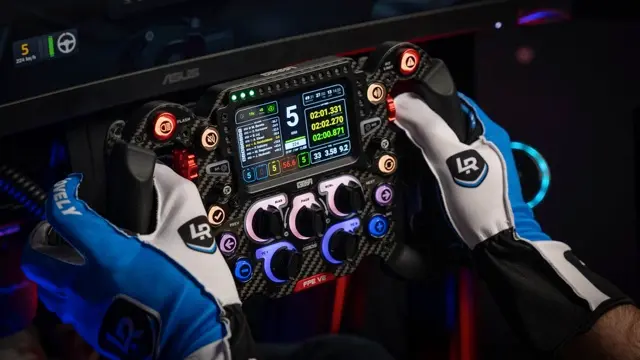
Lovely Sim Racing: when design meets precision in your Simracing Dashboard
At Simracing.Fan, we’re always on the lookout for tools that make virtual racing feel closer to the real thing. Every once in a while, we come across a project that nails both the look and the functionality of professional racing gear. Lovely Sim Racing is one of those cases — a small independent team that’s redefining what a simracing dashboard should be.
Their creation, the Lovely Dashboard, has quickly gained a reputation in the community for its clean design, flawless SimHub integration, and surprisingly deep feature set. It’s not just another dashboard skin — it’s a fully thought-out ecosystem made for racers who value both data and aesthetics.
Built for real drivers — not just screens
The Lovely Dashboard was designed from the ground up by simracers who understand what matters when you’re at full throttle: clarity, speed, and focus. Every element on screen has a purpose.
No clutter, no unnecessary animations — just the critical telemetry you need to stay consistent lap after lap.
It runs through SimHub, which means it’s compatible with virtually every major simulator: Assetto Corsa Competizione, iRacing, rFactor 2, Automobilista 2, RaceRoom, Formula 1 titles, and more. One install, multiple sims — a single dashboard for your entire virtual garage.
What makes the Lovely Dashboard special
Instead of reinventing telemetry, Lovely Sim Racing has focused on polish, usability, and modularity.
Here’s what stands out the most when you use it:
- Real-time performance data — lap times, sector splits, tyre temps, fuel levels, and car status, all perfectly aligned in a minimalistic layout.
- Multiple display variants — from compact 5-inch DDU screens to large 10-inch or ultra-wide displays, curved dashboards, and even round screens.
- True Dark Mode — designed for endurance races and night sessions, reducing eye fatigue while keeping contrast crisp.
- Flexible modules — customize layouts, quick views, and secondary pages directly through the Lovely Plugin inside SimHub.
- Stream overlays and timing towers — if you’re broadcasting or streaming, you can extend the dashboard to on-screen graphics for your viewers.
Everything feels handcrafted, as if the team built it for their own rigs first — because they actually did.
Plug-and-play simplicity
Despite its professional polish, setting up the Lovely Dashboard is refreshingly simple:
- Install SimHub — if you’re a simracer, you probably already have it.
- Download the Lovely Plugin from the official Lovely Sim Racing website.
- Select your dashboard variant (standard, curved, XL, or round) from within the plugin.
- Assign controls — such as page navigation or quick views — to your wheel or button box.
- Launch your favorite sim and enjoy a full telemetry suite at your fingertips.
No complicated setup, no hidden steps — just connect, configure, and race.
Multiple versions for every rig
The Lovely Dashboard is available in several screen formats, all designed to look professional and read clearly during a race:
- Standard 850×480 DDU – ideal for compact dashboard units.
- Curved Edition – for rigs with rounded instrument housings.
- XL and UXL Editions – ultra-wide (1280×480 and 1920×480) layouts for 10-inch displays or integrated monitor strips.
- Round Edition – perfectly tailored for circular dashboard screens.
- Companion & Portrait Mode – great as a secondary or vertical display.
Each layout preserves the same design language: clear typefaces, perfect contrast, and fast readability.