

 Written by
 Introduction: SCS Software Drops the ETS2 ATS 1.61 Experimental Beta
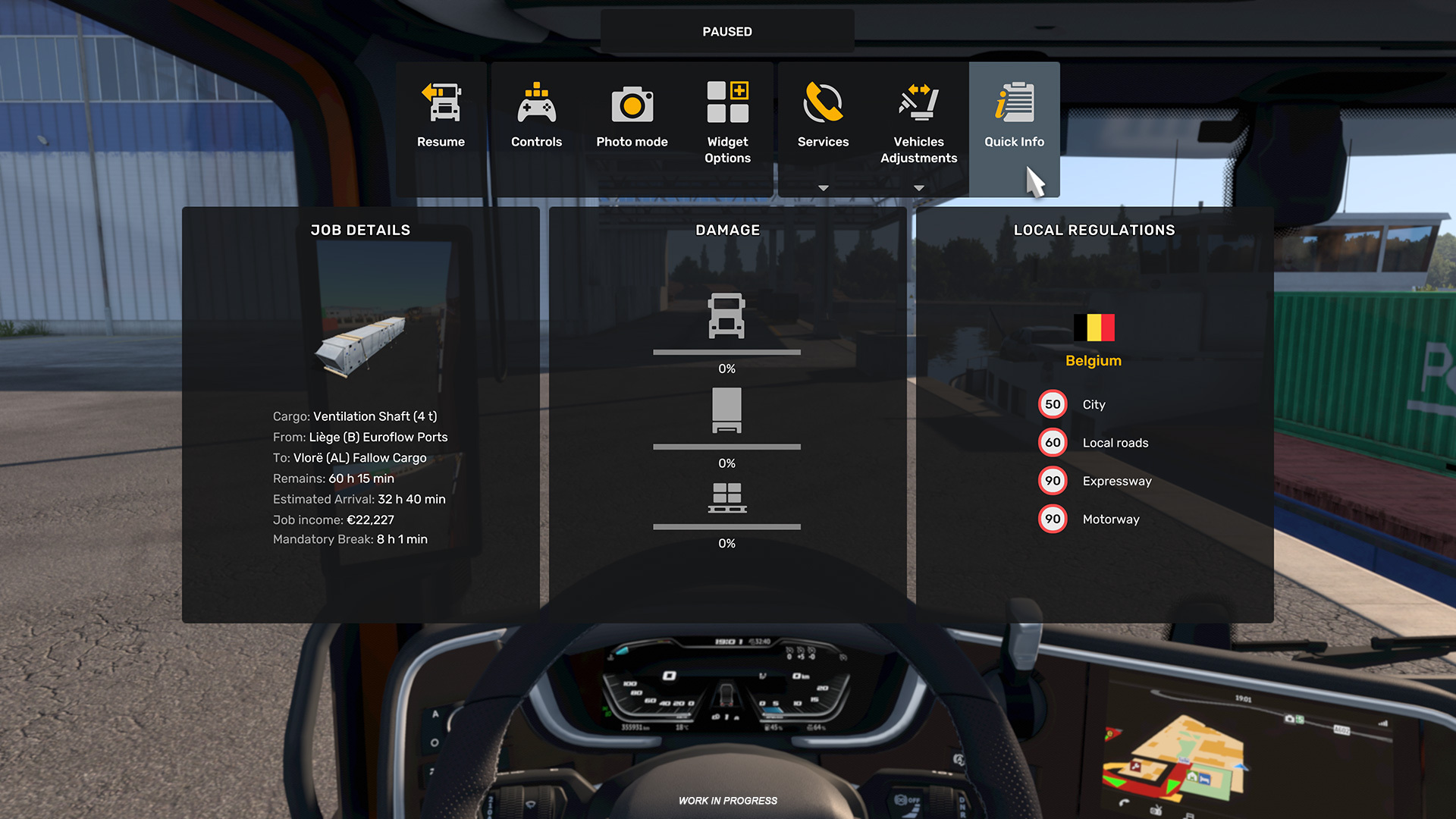
The ETS2 ATS 1.61 experimental beta is now live on Steam, and SCS Software wasted no time following up on the 1.60 stable release. Pushed to the experimental beta branch for both American Truck Simulator and Euro Truck Simulator 2 just weeks after 1.60 went stable, the update centers on two changes: a Multi-Function Display (MFD) for in-cab controls and a redesigned In-Game Menu that folds several separate screens into one horizontal bar. Both features are still rough — English-only text, partial controller support, and a few workflow quirks are part of the deal while SCS Software collects feedback from testers. Drivers who follow our American Truck Simulator coverage will recognize this as exactly the kind of quality-of-life pass the community has been asking for.
The Multi-Function Display, introduced in the ETS2 ATS 1.61 experimental beta, is a new in-cab interface built by SCS Software for Euro Truck Simulator 2 and American Truck Simulator. It consolidates driving assistance settings, exterior and interior lighting controls, media playback, and trip information into a single navigable panel that stays open without pausing the simulation, unlike the older menu system. Paired with it is a redesigned In-Game Menu, a horizontal bar that merges what used to be separate F1, F4, and F7 screens into one interface opened with a single keypress. Together, these two features represent the most significant interface overhaul either title has received in years, and SCS Software has explicitly framed the branch as experimental — a testing ground where localization, controller mapping, and edge-case behavior are still being ironed out before a wider rollout to the stable branch.
What’s New in ETS2 & ATS 1.61 Experimental Beta
The core of this beta is a rework of how drivers reach in-cab tools and menus. Instead of separate windows for driving assistance, lighting, media, and trip information, the Multi-Function Display puts all of it behind one navigable interface. Alongside that, the In-Game Menu merges functions that used to sit behind F1, F4, and F7 into a single bar at the top of the screen, opened with one keypress.
Neither feature is finished. SCS Software has flagged this as an experimental branch, so controller interactions are limited for now and localization hasn’t caught up with the new UI elements. For a refresher on how the studio typically handles staged rollouts, check our SCS Software update coverage, which tracks each patch from experimental beta through to stable release.
Gameplay & Content Updates
The Multi-Function Display is the bigger change for day-to-day driving. It’s accessible from both the interior cab view and the exterior camera, letting players cycle through driving assistance settings, lights, media playback, and trip data without stopping the simulation. Previous menu systems in ETS2 and ATS routinely paused the game for these checks, breaking the flow of a long drive; the MFD is designed to keep running while it’s open.
Input support for the MFD currently covers keyboard, mouse, and steering wheel setups without issue. Controller users get partial support — only the In-Game Mapping Mode works with a gamepad in this build, so full controller navigation of the MFD isn’t there yet.
- MFD accessible from interior and exterior camera views
- Covers driving assistance, lights, media, and trip info in one place
- Keyboard, mouse, and wheel fully supported
- Controller support limited to In-Game Mapping Mode for now
- Interface text is English-only during the beta phase
Technical & Performance Changes
The second major piece is the In-Game Menu, a horizontal bar that replaces the old F1/F4/F7 split. Pressing F1 now brings up this consolidated menu, folding in functions that used to be scattered across separate screens. It’s a straightforward simplification, but it resets muscle memory for anyone who’s been mapping those keys for years, and it’s worth a few test drives before jumping into a long-haul route or an online convoy.
Behavior differs by mode. In singleplayer, opening the In-Game Menu pauses the simulation, just as the old menus did. In multiplayer, the menu is locked out while driving in a convoy — a deliberate choice so one player checking a menu doesn’t freeze the session for everyone else. It’s a reasonable trade-off, but multiplayer drivers will need to plan menu checks around convoy breaks rather than mid-route, especially on longer deliveries where checking trip data used to be a quick habit.
Summary Table of Key Changes
Here’s a quick breakdown of what’s changed in the 1.61 experimental beta and what it means in practice:
| Area | Change | Impact |
|---|---|---|
| Multi-Function Display | New in-cab interface for driving assistance, lights, media, and trip info | Faster access to vehicle systems without pausing the game in most cases |
| Input Support | Keyboard, mouse, and wheel fully supported; controllers limited to In-Game Mapping Mode | Controller users have restricted MFD navigation for now |
| In-Game Menu | Consolidates former F1, F4, and F7 menus into one bar, opened with F1 | Simplifies menu navigation but changes established keybind habits |
| Singleplayer Behavior | Opening the In-Game Menu pauses the simulation | Matches previous menu behavior, no change for solo drivers |
| Multiplayer Behavior | In-Game Menu unavailable while driving in convoy | Prevents one player from pausing the session for the group |
| Localization | New features currently English-only | Non-English players will see untranslated UI elements during the beta |
How to Opt In to the Experimental Beta Branch
Getting into the ETS2 ATS 1.61 experimental beta takes a few clicks in Steam and no password, which keeps the process simple for anyone who wants to test the new MFD and In-Game Menu before they roll out more broadly.
- Open your Steam Library and right-click on American Truck Simulator or Euro Truck Simulator 2.
- Select “Properties” from the context menu.
- Go to the “Betas” tab.
- From the dropdown menu, select “experimental_beta.”
- Let Steam download the update — no code or password required.
Once installed, the game launches with the experimental branch active. Beta builds can occasionally clash with mods, so back up your save files or disable heavier mods before jumping in, especially if you’re running a mod-heavy profile for either title. Switching back to the stable branch later is just as easy — return to the same Betas tab and select “None” from the dropdown.
Known Issues and Community Feedback
SCS Software has labeled 1.61 an experimental beta rather than a finished product, and the gaps show. Limited controller support for the MFD is the most obvious one right now, and English-only text will be a sticking point for international players until localization catches up. The multiplayer restriction on the In-Game Menu during convoy driving is by design, not a bug, but it’s worth knowing before jumping into a group session expecting full menu access mid-route.
SCS Software has a track record of adjusting experimental branches based on player reports before features move to open beta and then to the stable release. Steam discussions and the official forums remain the main channels for that feedback loop as the studio works through the rough spots, and past cycles suggest controller mapping and translations are usually among the first things to get patched as the branch matures.
FAQ
Does the 1.61 experimental beta apply to both ETS2 and ATS?
Yes. The update covers both Euro Truck Simulator 2 and American Truck Simulator, since SCS Software develops and updates the two titles in parallel, and the experimental branch is available for each on Steam.
Is the experimental beta safe to run with mods?
It can run alongside mods, but experimental branches are more likely to break compatibility than stable releases. Back up your saves and test with a lighter mod list first before committing your main profile to the beta branch.
Do I need a password to access the beta?
No. Selecting “experimental_beta” from the Betas tab in Steam’s game properties is enough — there’s no password gate for this branch, unlike some closed test builds SCS Software has run in the past.
Will the MFD work with my controller?
Partially. In this beta, controllers only support the In-Game Mapping Mode within the MFD. Full controller navigation isn’t available yet, so gamepad users should expect a rougher experience than keyboard, mouse, or wheel setups.
Is the new interface translated into other languages?
Not yet. The Multi-Function Display and In-Game Menu are currently English-only during the experimental phase, though localization is expected to catch up before the features reach the stable branch.
Can I still use the In-Game Menu while driving in a multiplayer convoy?
No. The menu is unavailable while actively driving in a convoy in multiplayer, though it functions normally in singleplayer, where it pauses the game just as the previous menu system did.
Conclusion
The ETS2 ATS 1.61 experimental beta is a modest but meaningful step for American Truck Simulator and Euro Truck Simulator 2, aimed at cleaning up how drivers interact with vehicle systems and menus. The Multi-Function Display and the new In-Game Menu both point toward a tighter cockpit experience, even if controller support and localization still need work. For simracers curious about where SCS Software is heading next, opting into the beta branch now is the quickest way to see it firsthand.
Source: store.steampowered.com